

In short
Six of the most popular fundamental tasks now arrive as a narrated, animated video instead. Each is a genuine variant of its written original, so the two are interchangeable.
Fifteen other releases shipped in August, from one switch that turns off every AI feature to three technologies Codility could not assess before.
- A written task statement is the most exposed part of an assessment, because text can be copied out, posted, scraped or pasted into a model.
- Six of the most popular fundamental tasks now arrive as a narrated, animated video instead. Each is a genuine variant of its written original, so the two are interchangeable.
- Device integrity and pattern detection now raise the Integrity Risk band on their own, rather than waiting for a reviewer to go looking.
- One account setting now turns every AI feature off at once, for organizations that cannot permit AI tooling.
- Playwright, Erlang and Clojure arrived, each with platform support, ready-made tasks and self-serve authoring together.
- AI for Business candidates can open the data behind their task instead of asking the assistant to read it out.
- The table below lists everything that shipped. The full record is at the end of this page.
What shipped in August 2026?
Sixteen releases. The article below argues the two that changed most, and the full record is at the end of the page.
| Release | What it does | Why it matters | Status |
|---|---|---|---|
| Video task statements | Six popular fundamental tasks arrive as a narrated, animated video | There is no written statement to copy out and post | Live |
| Device integrity and pattern detection in the risk band | Both signals now raise the overall Integrity Risk band, and filter across a whole batch | Reviewers act on them without going looking | Live |
| One switch for every AI feature | A single account setting sits above every individual AI setting | One auditable control to put in front of a compliance review | Live |
| Playwright | Task environment, ready-made tasks and self-serve authoring | Assess end to end browser testing | Live |
| Erlang | Task environment, ready-made tasks and self-serve authoring | Assess systems that are not allowed to go down | Live |
| Clojure | Task environment, ready-made tasks and self-serve authoring | Assess teams running Clojure alongside Java | Live |
| A repeatable path for new technologies | Every new technology now ships platform support, tasks and authoring together | Asking for one has a known outcome | Live |
| 30 quality assurance tasks | Selenium and REST Assured, including an easy tier REST Assured never had | Hire test automation engineers at the right level | Live |
| Tasks for models in production | A retrieval family in six languages, plus a model evaluation task | Hire for the work of putting models into production | Live |
| More candidate-choice tasks | Three more tasks where the candidate picks from up to nine languages | Assess the skill rather than the syntax | Live |
| AI for Business data files | Roster, scores and brief open in a tab beside the task description | More of the session goes on judgment, not retrieval | Live |
| Feedback on the employee profile | Personalized feedback surfaces where the employee already looks | Feedback that was written gets read | If enabled |
| Special arrangements recipients | A program owner nominates who receives adjustment requests | Accommodation routing can be shown to an auditor | Live |
| API keys per application | An integration user can hold several applications and keys | Create a new key before retiring the old one | Live |
| Databases in VS Code | MongoDB, MySQL, Postgres and Redis wire themselves into the workspace | Less setup time inside a technical screen | Open preview |
| Inter typeface, and AI Copilot context | Inter replaces Roboto, and the AI Copilot carries more workspace context | Explains why the product looks slightly different | Live |
Why is the task statement the weakest part of an assessment?
Most of the effort in assessment integrity goes on watching the candidate: proctoring, behavioral signals, similarity checks, risk scoring. All of it pointed at the session where someone is answering the question.
The question itself leaks. A task statement is text, and text can be copied out, posted on a forum, indexed, and pasted into a model. From that point the task measures who found the post rather than who can do the work, and watching the candidate does not detect it, because nothing about their session looks unusual. Rotating content faster buys time without changing the property that makes a task leak, which is that the problem exists as text at all.
This is the same argument as how you prevent cheating in coding assessments, pointed at content rather than candidates.
What changes when the problem is narrated instead of written?
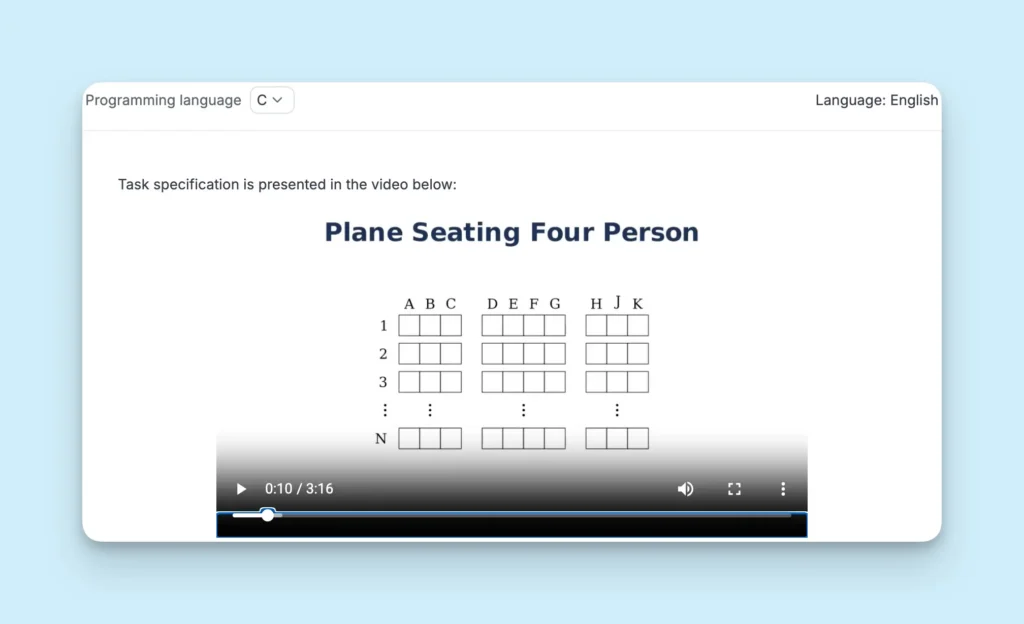
Six of the most popular fundamental tasks now come as a video. The candidate watches a short lecture where the problem is explained and animated on a board, then solves it as normal.
There is no statement to copy out. Passing the problem around means transcribing it, which is real work rather than a keyboard shortcut. This does not make a task impossible to leak, and someone determined will sit down and write it out. It moves the cost of doing so from nothing to something.
Each video task is a genuine variant of the written task it came from, so the two can be swapped or mixed inside one randomized assessment, and both sit in the same libraries as their written counterparts.
What else changed in August?
The table above lists all sixteen releases. Four of them carry an argument of their own.
- A signal nobody looks at is not a control. Device integrity and pattern detection both worked, and both needed a reviewer to go looking for them. Either one now raises the overall Integrity Risk band by itself, and whole batches can be filtered by either signal. Raising a band points a reviewer at the right sessions rather than deciding anything on its own.
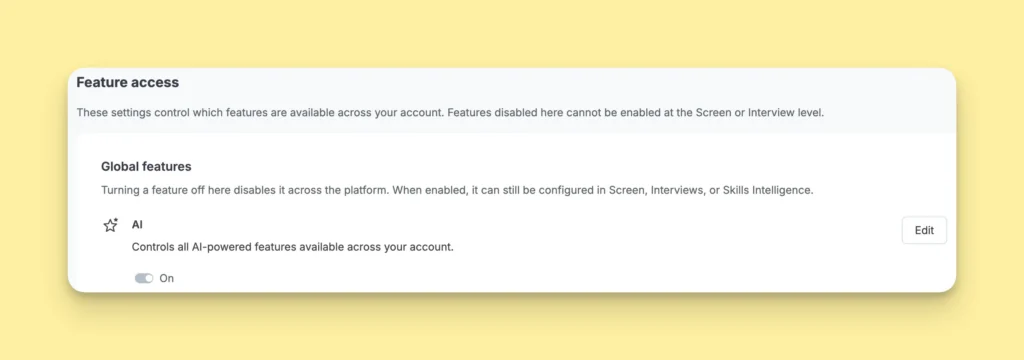
- You cannot put a list of settings in front of a compliance review. You can put one switch in front of it. Account settings now carry a single AI switch above every individual AI setting, so an organization that cannot permit AI tooling can adopt the platform without adopting the AI, and can show which of the two it has done.
- A library that only grows when a vendor decides to grow it will always lag the stacks people are hiring for. Playwright, Erlang and Clojure each arrived with platform support, ready-made tasks and self-serve authoring together, which is now the standard shape for a new technology rather than a one-off.
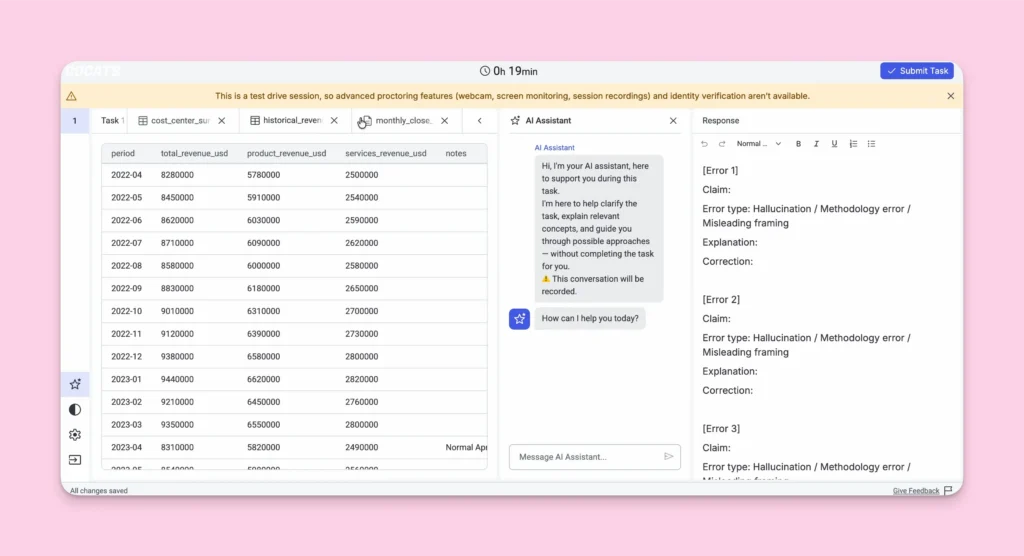
- Reading the data is part of the work. AI for Business task files now open in a tab beside the task description instead of living only in the assistant’s context, so more of the session goes on the judgment the scenario was built to draw out.
What does this mean for how you run assessments?
Keeping an assessment trustworthy has been framed as a detection problem for a long time: watch harder, score the signals, flag the outliers. August moved a different lever. A narrated problem is harder to pass around because of what it is, not because of what anyone spotted. A signal that moves the summary reading gets acted on because of where it sits, not because a reviewer got more diligent.
Structural changes hold up when nobody is paying attention, which is the property worth optimizing for, because the alternative depends on sustained vigilance from people who have a pipeline to get through.
If you run Codility today, most of what is described here is already on. The AI features are the exception and start switched off, and an admin turns them on in account settings.
—
Everything that shipped in August
Every release from August 2026, whether or not it appears above. 16 entries.
Fundamental tasks delivered as video
LiveA narrated, animated problem is far more awkward to copy, scrape or paste into a model than a page of text, so passing a task around costs real effort. Six of the most popular fundamental tasks now have a video counterpart, each a genuine variant of the written task it came from, so the pair can be swapped or mixed inside one randomized assessment. It does not make a task impossible to leak.
What’s New
- Six fundamental tasks with a narrated, animated video statement
- One in the Starter library, one in Core, four in Advanced
- A seventh video task in the coding library, added earlier in August
- Each one usable interchangeably with the written task it varies
Availability
Live now, available according to your packages.
Device integrity and pattern detection feed the Integrity Risk band
LiveA reviewer scanning Integrity Risk now sees the effect of two of the more telling signals without opening anything else. Device integrity and pattern detection sat outside the band before August, so they existed mainly for reviewers who already knew to check. Either one now raises the band by itself, and a whole batch can be filtered by either signal. Raising a band points a reviewer at the right sessions rather than deciding anything on its own.
What’s New
- Device integrity and pattern detection now factored into the Integrity Risk band
- Candidate filtering by either signal on Test Mission Control and the Candidates page
- Applies to new assessments created with these features switched on
Availability
Live for new assessments created with device integrity or pattern detection switched on. Device integrity runs through the Codility Desktop App and is in Open preview.
Playwright as a task environment
LiveQuality assurance teams can now be assessed on the framework they have actually moved to. Playwright drives a real browser to test web applications end to end, and it has been one of the most frequently requested technologies in the library. Tasks landed in Core as well as Advanced, so it is usable on the packages most teams already hold.
What’s New
- Playwright available as a regular task environment
- 15 ready-made tasks across the Core and Advanced libraries
- Custom Playwright task authoring in the task builder and through the task creation MCP server
- Coverage from locators and form controls up to shadow DOM, network diagnostics and stateful checkout
Availability
Live now, available according to your packages.
Erlang on the platform
LiveTeams running Erlang in production can now assess for it rather than hiring on a proxy skill or on a conversation. Erlang was built in the 1980s for systems that are not allowed to go down: telecom switches, messaging backbones, payment rails. Tasks cover the distinctive parts of the language rather than generic algorithm work.
What’s New
- Erlang supported on the platform
- 20 tasks across the Starter and Core libraries
- Erlang available for self-serve task authoring, including through the task creation MCP server
- Coverage from list and map fundamentals up to worker pools, checksummed protocol decoding and nested validation
Availability
Live now, available according to your packages.
Clojure on the platform
LiveA single Clojure team inside a much larger Java estate is the hiring case a general-purpose library serves worst, and it is now covered. Clojure runs on the same machinery as Java, so companies add it to systems they already have rather than starting over. Tasks are built on the idioms rather than translated from another language.
What’s New
- Clojure supported on the platform
- 15 tasks across the Starter and Core libraries
- Clojure available for self-serve task authoring
- Coverage from data joins and username normalization up to multi-tier rate limiters and log aggregation pipelines
Availability
Live now, available according to your packages.
Every new technology now arrives with three things
LiveAsking for a technology Codility does not support now has a known outcome rather than an open-ended queue. Starting with Playwright, each new language or framework arrives as a complete package, and the three parts arrive together, so there is no window where the platform runs a technology but nothing can be assessed in it.
What’s New
- Platform support for the technology
- An initial set of ready-made tasks covering the immediate hiring need
- Self-serve authoring in that technology, in the task builder and through the task creation MCP server
- Playwright, Erlang and Clojure all followed this shape
Availability
Live. In effect for every new technology from the Playwright release onward.
Quality assurance and test automation tasks
LiveQuality assurance candidates can be assessed on the job rather than on general coding ability, which measures something adjacent to it. 30 new Selenium and REST Assured tasks close most of the largest requested gap in the library, and REST Assured gained the easy tier it never had. Playwright arrived in the same month and has its own block above.
What’s New
- 13 Selenium tasks in Java, from data grids and native dialogs up to accessibility auditing, script injection and waiting that survives a flaky page
- 17 REST Assured tasks in Java, from pagination and idempotency keys up to contract verification, regional failover and GraphQL query building
- The easy tier REST Assured never had, so the framework is now usable for early-stage screening rather than senior hiring only
- Both frameworks sit in the Advanced library, because Core is already covered for each
Availability
Live now, available according to your packages.
Tasks for teams putting models into production
LiveThe role most teams are hiring for and least able to test is now assessable as a distinct skill. Retrieval-augmented generation fetches the most relevant documents from a knowledge base before a model answers, so the answer is grounded in your own data, and it is the shape most production deployments take. Judging a model’s output is a separate job from building it, and has a task of its own.
What’s New
- Conversational retrieval-augmented generation as one brief in six versions: Python, TypeScript, Go, LangChain, Java, and a version running real embeddings rather than mocked ones
- A model evaluation task covering answer accuracy, calibration, steadiness across reworded questions and refusal detection, gathered into one scorecard
- A support email router built on LangChain, a support ticket assignment task, a document clustering task and a linear regression task, all in the VS Code environment
Availability
Live now, available according to your packages.
More tasks where the candidate picks the language
LiveHiring for engineering judgment rather than for a specific stack no longer means maintaining a separate task per language. Three new tasks let the candidate answer in whichever of up to nine languages they are strongest in, measuring the same skills either way, so results stay comparable across a mixed pipeline.
What’s New
- Rebuilding resource state from a webhook stream full of duplicates, disorder and deletes, in one of seven languages
- Counting phone numbers hidden in free text, in one of nine languages
- Implementing a REST endpoint with an exact-match filter, in one of nine languages: Python, Go, Java, JavaScript, TypeScript, Ruby, Rust, C++ or C#
- Candidates may solve in more than one language, and the strongest attempt counts
Availability
Live now, available according to your packages.
AI for Business candidates can open the task data
LiveMore of a business candidate’s session goes on the judgment the scenario was built to draw out, and less on retrieval. An AI for Business task is built on real data: a team roster, a set of productivity scores, a company brief. Those files used to live only in the assistant’s context. They now open in a tab beside the task description, carrying the same copy and print restrictions.
What’s New
- Attached files listed under the task description, opening in a tab beside the brief
- Spreadsheet files rendered as a table with a fixed header row
- Formatted view for text and document files
- The assistant repositioned to the middle of the workspace, between the task description and the response
- Copy and print protection carried across to file previews
Availability
Live across Screen and Skills Intelligence.
Personalized feedback on the employee profile
LiveAn employee now finds the feedback written for them, which is what a skills program needs in order to pay off. Personalized feedback has existed for a while, two clicks deep inside a report tab. It now announces itself on the employee’s own profile, marked visible only to them, and past assessments are included. Manager views are unchanged.
What’s New
- Personalized feedback banner on the employee profile, with a visible-only-to-you lock
- The Timeline tab is now Assessment feedback, carrying a count of unread items
- Review and Read again buttons on every task, opening the report at that task’s feedback
- Past assessments included
Availability
Live for accounts with AI candidate feedback switched on. Nothing new to enable.
Special arrangements recipients on a program
LiveAn adjustment request now reaches someone who can act on it. The recipient used to be fixed account-wide, so on a large program the request often landed with the wrong owner. Whoever owns a program now nominates who receives its requests, chosen from the eligible admins and managers on the account.
What’s New
- Special arrangements recipients field when creating a Skills Intelligence program
- The same field on the program details view
- Recipient suggestions drawn from eligible admins and managers
Availability
Live.
Additional services connect themselves in VS Code
Open previewNobody loses the first stretch of a session working out a connection string. Adding MongoDB, MySQL, Postgres or Redis to a VS Code space used to leave the connection to be made by hand. Adding one of the four now wires it into the workspace automatically, so the environment is ready when it opens.
What’s New
- Automatic connection between an added service and the VS Code workspace
- Supported across most VS Code environments, including Bash, C, C++, Dart, Django, .NET, Go, Java, Jupyter Notebook, Kotlin, Next.js, Node.js, Python, R, Ruby, Rust, Spring Boot and Swift
- Service attachment removed from environments where a database does not apply, namely React, Angular, Terraform and SystemVerilog
Availability
In Open preview, so it is on for every account.
Create a new API key before retiring the old one
LiveRotation becomes four steps you control: create the new key, move the integration across, confirm it works, then revoke the old one. An integration user used to hold one application and one API key, so rotating it meant a reset that replaced credentials still in use. Several can now be held at once, and the old key stays valid until you revoke it. Revoked keys stay listed, so an integration user carries its own history.
What’s New
- Multiple applications and API keys per integration user
- Add, rename and revoke individual applications and keys, with redirect URIs set per application
- Show and hide toggle for revoked keys and applications, and a delete action once they are no longer needed
- The existing reset flow kept for applications owned by regular platform users
- Account admins hold the permission by default and can grant it to other roles
Availability
Live for all customers.
One switch for every AI feature
LiveOne account-level control that can be shown to a legal or compliance reviewer is usually what that conversation is actually after. Some organizations cannot permit AI tooling at all, and until August that meant finding several separate settings and trusting nothing new had been added underneath. Turn the new switch off and every AI feature is off across the account, whatever the individual settings say. Turn it on and each behaves as before.
What’s New
- A global AI switch in account settings, under Feature access, in the Global features group
- Every AI feature disabled across the account while the switch is off, and it cannot be re-enabled at the Screen or Interview level while it is off
- Each feature returned to its own setting when the switch is on, still configurable in Screen, Interviews and Skills Intelligence
- Applied to existing accounts, so there is nothing to set up first
Availability
Live in account settings. Changing it is an admin action.
A new typeface, and a better-oriented AI Copilot
LiveIf the product looks slightly different than you remember, this is why. Inter replaces Roboto across the platform, designed for screens with readability and accessibility in mind. Separately, the AI Copilot carries more context about the workspace it is running in, so it stays closer to the task in front of the candidate.
What’s New
- Inter replaces Roboto across the Codility platform
- The AI Copilot carries more context of the workspace it is connected to
Availability
Live across the Codility platform.
Frequently asked questions
Why does Codility deliver some task statements as video?
Because a written statement can be copied out of an assessment and shared, and a narrated, animated problem is far more awkward to move around. Six of the most popular fundamental tasks now have a video counterpart. It raises the effort of passing a task around without changing what the task measures. It does not make a task impossible to leak.