
Latest from the lab
See how well candidates use Claude Code and Codex · Nov 2026 update
- Codex now runs next to Claude Code, so candidates use the coding agent they already know.
- The Task Randomizer, which gives each candidate different, comparable tasks, is now on for every account.
- InfraLab and TicketDrop test system design with no code to write. All 23 October releases are in the table below.
What shipped in October 2026?
23 releases shipped in October 2026.
| Release | What it does | Why it matters | Status |
|---|---|---|---|
| Codex next to Claude Code | Candidates use Codex in the VS Code terminal | Candidates use the coding agent they know | Open preview |
| AI skills evidence | Reports show 5 AI skills, quoting the candidate’s prompts | Judge AI skill without reading the full transcript | Open preview |
| Task Randomizer for every account | Each candidate gets different tasks from pools of similar ones | Helps reduce task sharing in large hiring rounds | Live |
| InfraLab and TicketDrop | Candidates design a system on a board, tested under load | See system design with no code to write | Live |
| Task collections | Group library tasks into collections the account shares | The right tasks in front of every interviewer | Live |
| Skills summary | A plain summary opens every skills section | Hiring managers read skills at a glance | Live |
| Tasks on Claude Code, Codex and GitHub Copilot | 36 multiple-choice tasks on three coding agents | Check knowledge of a tool the job names | Live |
Show 16 more releases
| Release | What it does | Why it matters | Status |
|---|---|---|---|
| Screen setup check | Candidates check camera, screen and browser before starting | Problems get fixed before the timer starts | Open preview |
| Special arrangements request | Hide the request on the intro page | Candidates see one place to ask | Live |
| Basic coding or Advanced coding | A clear choice of editor when setting up an interview | The right environment for each interview | Live |
| Edit an interview | Change tasks, interviewers and settings after creation | Fix an interview in place | Live |
| Reveal the description by section | Release a task one step at a time | Run multi-stage tasks in one codebase | Available |
| Follow the candidate | Follow takes you to the candidate’s screen | See what the candidate is working on | Live |
| Save technology-agnostic tasks | Save interview tasks to the account’s library | A shared set of interview tasks | Live |
| Edit saved VS Code tasks | Change a saved task and save it as a new one | Reuse a task with your changes | Live |
| AI usage during the interview | Shows the AI allowance used, by model | Track AI use as it happens | Live |
| Memory-limited C++ tasks | Three tasks scored on memory footprint | Assess engineers who work under memory limits | Live |
| Salesforce Commerce Cloud tasks | 28 tasks for backend, frontend and architect roles | Assess a platform no editor can run | Live |
| Invitation email links | FAQ and practice test follow the assessment type | Business candidates get business material | Live |
| Oracle Recruiting Cloud | Screen assessments inside Oracle Recruiting Cloud | Invitations and results stay in one system | On request |
| SmartRecruiters packages | Choose which folders and packages sync | A shorter, clearer package list | Live |
| iCIMS expired assessments | Expired assessments show in iCIMS | Recruiters see every assessment’s status | Live |
| Code Health in the API | Code Health score for each Screen task | Use the score in your own systems | Live |
How do you judge how well a candidate uses AI?
When a candidate builds with an AI assistant, the record of how they did it is the transcript: every prompt, every answer, every change. It holds everything, and few reviewers read it end to end for every candidate. AI Usage Insights already showed how much a candidate used AI. It could not show how well.
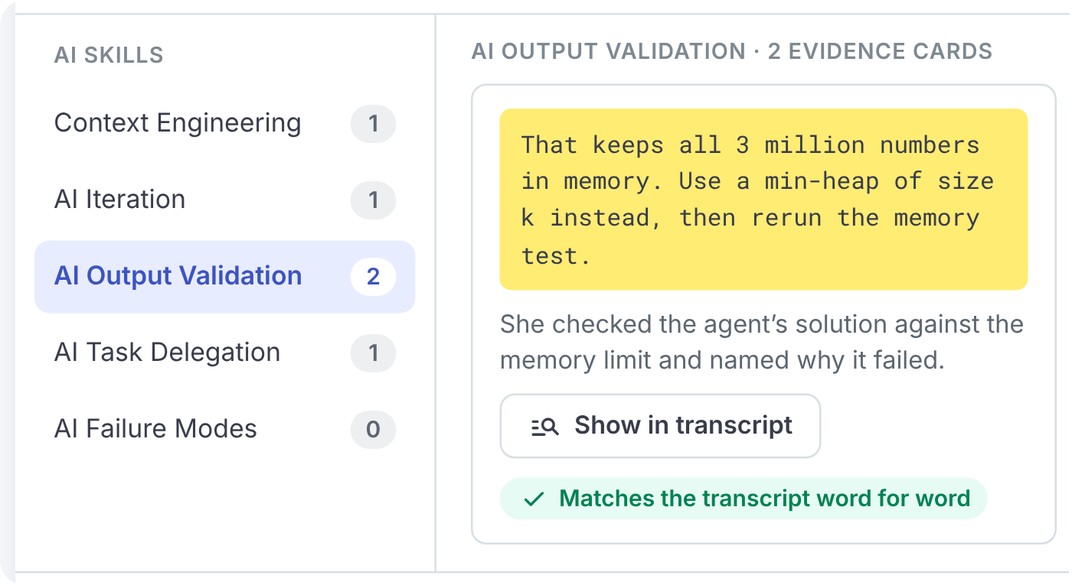
Task reports in Screen, Interview and Skills Intelligence now carry an AI skills section. It covers 5 AI skills. Each skill opens evidence cards with the candidate’s own words and one sentence on why they show that skill. Every quote must match the transcript word for word, so a reviewer can check any card in seconds and turn it into a follow-up question for the interview.
The evidence informs your review and never changes the score. Codility gives your hiring team the evidence, and your team makes the final decision.
Read why detecting AI use is the wrong hiring question.
Can candidates use Codex in a Codility assessment?
Yes. Since October 19, 2026, OpenAI’s Codex CLI runs next to Claude Code in the VS Code terminal, in Screen, Interview and Skills Intelligence. Candidates pick the agent they already use at work.
In Interview, you and the candidate share the same live terminal, so you see each prompt and answer as it happens. The hidden instructions you give the coding agent in Interview now work with Codex too, so you can ask either agent to slip in a bug and see who reviews the code. Codex conversations are saved to the report, and AI Usage Insights show Codex and Claude Code separately. AI skills evidence works with both.
Watch Codex in Codility, or read how to see how well a candidate works with Claude Code or Codex.
How do you see how a candidate designs a system?
System design usually gets judged at a whiteboard, from what a candidate says they would build. In InfraLab and TicketDrop, two new tasks in the Advanced library, the candidate builds the system on a board. A simulator replays traffic against it, and the load lab shows the symptoms, so you see how the candidate finds the cause and fixes it.
TicketDrop suits backend engineers who own a whole system. InfraLab suits DevOps, cloud and site reliability engineers. Both are scored automatically, with no code to write.
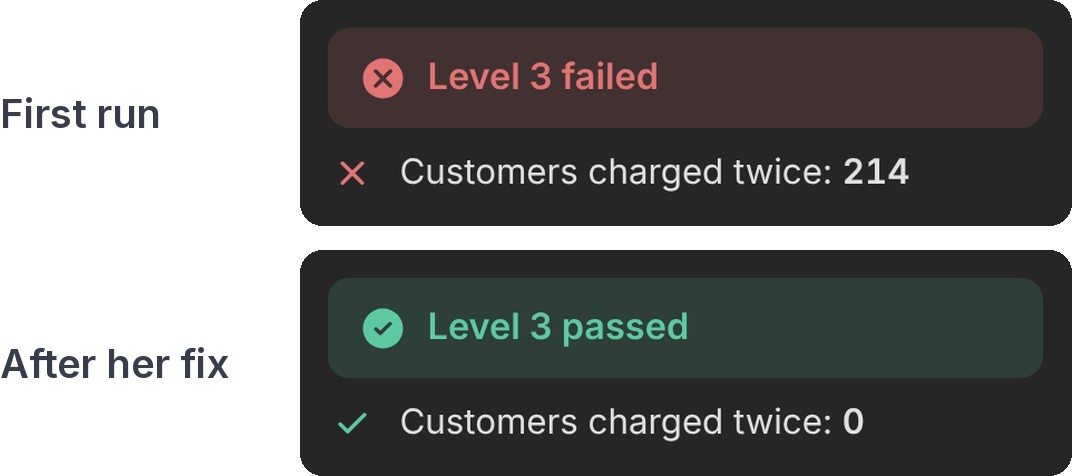
Try it below: watch a mission play, or build one yourself. The full system design demo has both tasks.
What else changes for your hiring team?
Different tasks for each candidate, on every account
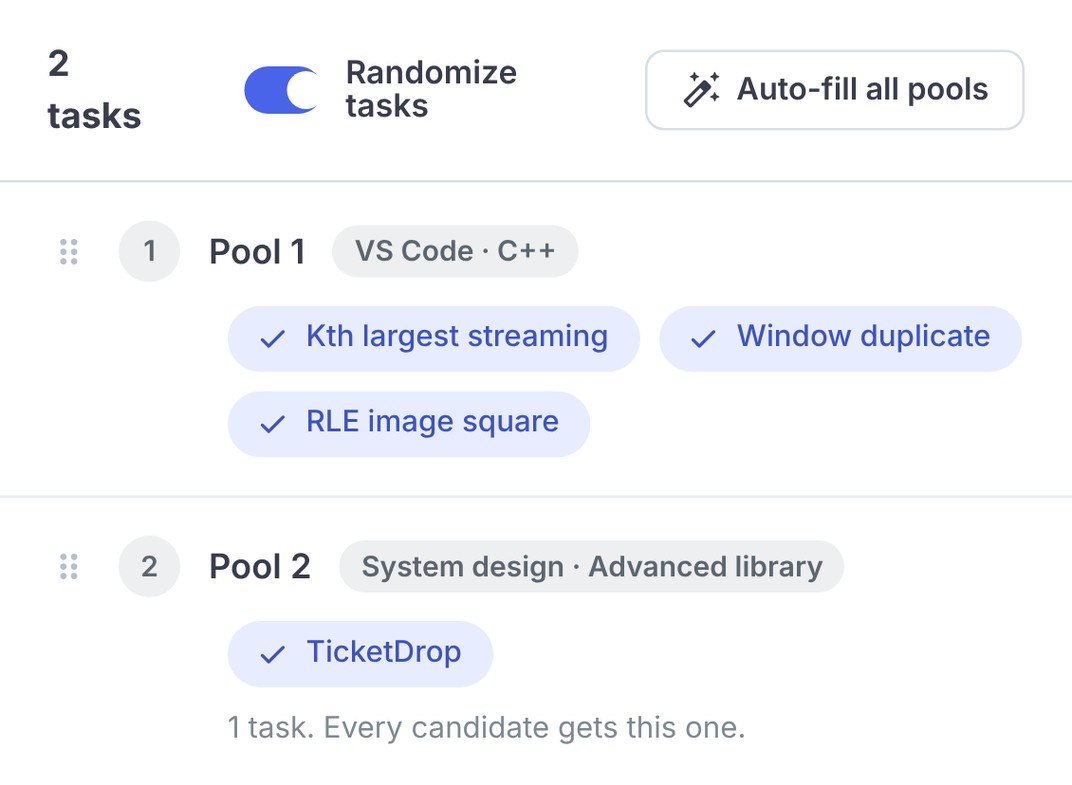
In a large hiring round, a task every candidate sees is a task that gets shared. The Task Randomizer is now on for every account. Each task in an assessment can become a pool of comparable tasks, so the next candidate gets a different one.
The same approved tasks for every interviewer
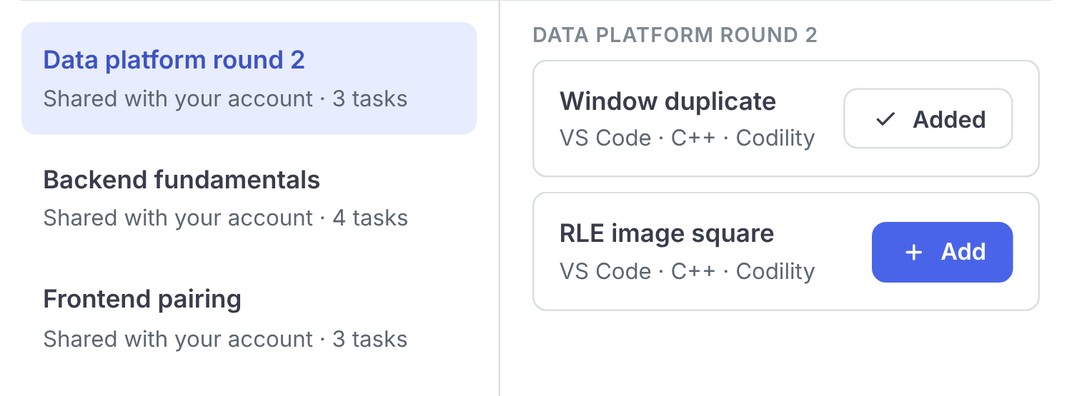
When each interviewer picks their own task, candidates in the same round get different interviews, and comparing them gets harder. With task collections, a team agrees on the tasks once and shares them across the account. Interviewers open them straight from the task selector.
Everything that shipped in October
Codex next to Claude Code in VS Code
Open previewCandidates can now use the coding agent they already work with. OpenAI’s Codex CLI runs next to Claude Code in the VS Code terminal, in Screen, Interview and Skills Intelligence.
What’s New
- One click opens Codex. No OpenAI account or API key needed
- In Interview, you share the candidate’s live terminal, and AI Instructions reach Codex too
- Codex conversations are saved to the report, and AI Usage Insights show each agent separately
Availability
In Open preview, for VS Code tasks with AI Assistance on.
AI skills evidence in task reports
Open previewAI Usage Insights showed how much a candidate used AI. Task reports now also show how well, with quotes from the candidate’s own prompts as proof.
What’s New
- 5 AI skills: Context Engineering, AI Iteration, AI Output Validation, AI Task Delegation and AI Failure Modes
- Every quote matches the transcript word for word
- Works with the AI Assistant, the AI Copilot, Claude Code and Codex
Availability
In Open preview for every account with AI Usage Insights.
The Task Randomizer, for every account
LiveThe Task Randomizer is now on for every account, when you build an assessment.
What’s New
- Turn on Randomize tasks when you order tasks, and Codility suggests similar tasks for each pool
- Fill every pool in one click
- Add or remove tasks in a pool after candidates are invited. Changes apply to candidates you invite from then on
Availability
Live for every account.
InfraLab and TicketDrop: design tasks with no code to write
LiveTwo new tasks show how an engineer designs a system, scored automatically. The candidate builds on a board, and a simulator replays traffic against the design.
What’s New
- InfraLab, for DevOps, cloud and site reliability engineers: six missions, each with a traffic load and a budget
- TicketDrop, for backend engineers who own a whole system: six levels where the candidate finds the cause behind each symptom
- Candidates write notes for the reviewer before each submit
Availability
Live in the Advanced library and above.
Task collections
LiveGroup tasks from the task library into collections the whole account shares.
What’s New
- Create and manage collections in the task library
- Open a collection from the task selector when you add a task to an interview
Availability
Live for every account.
A skills summary in every skills section
LiveHiring managers can now read a candidate’s skills at a glance. Reports open the skills section with a short summary of which skills the candidate showed, and at what level.
What’s New
- The summary always matches the skills table, and no AI writes it
- Thumbs up and down buttons let you tell us whether it helped
Availability
Live in Screen, Interview and Skills Intelligence.
36 tasks on Claude Code, OpenAI Codex and GitHub Copilot
LiveCoding agents now appear in job descriptions. 36 multiple-choice tasks check how well a candidate knows Claude Code, OpenAI Codex or GitHub Copilot, from everyday commands to secure practice and working with agents.
What’s New
- 12 tasks for each tool, across easy, medium and hard
- In medium and hard sets, at most 4 of 10 questions can be answered by someone who only knows a different tool
- Each set gets a freshness check every quarter
Availability
Live in the Core library.
A setup check before the test starts
Open previewCandidates can now fix camera, microphone, screen sharing and browser problems before the test starts. The setup check shows only what the assessment’s proctoring settings need, with a fix and a retry for each.
What’s New
- A slow connection shows a warning and never blocks the start
- Permissions granted in the check carry into the test
- The timer starts after the check
Availability
In Open preview, rolling out to Screen accounts in stages. Nothing to set up.
Hide the special arrangements request
LiveIf you run your own process for candidate adjustments, such as extra time, your candidates now see one place to ask. You can hide the special arrangements request on the intro page.
What’s New
- A new setting under Candidate experience, in Screen settings and in each assessment
- Admins can set the team default and lock it
- Skills Intelligence has the same setting in program and round settings
Availability
Live for every account. The request stays on until someone turns it off.
Basic coding or Advanced coding
LiveSetting up a coding interview now starts with a clear choice. Basic coding opens a simple editor, with languages shown as tiles. Advanced coding opens VS Code, with optional extra services and AI Assistance.
What’s New
- You or the candidate can pick the language in Basic coding
- In Advanced coding, you can let the candidate choose their own VS Code technology when you start from a blank task
Availability
Live in Interview.
Edit an interview after you create it
LiveYou can now edit an interview from the Edit interview action on the dashboard, in the same form you use to create one.
What’s New
- Change tasks, interviewers, schedule and settings
- Device integrity, identity verification, questions, skills and an attached candidate report can all change after creation
Availability
Live in Interview.
Reveal the task description section by section
LiveInterviewers can now release a task one step at a time, in the same codebase. Add sections to the task description that candidates cannot open until you reveal them.
What’s New
- Add a section from the editor toolbar
- Reveal each section separately with its own switch
- Candidates see a note to ask the interviewer about hidden sections
Availability
Available in Interview.
Follow takes you to the candidate’s screen
LiveClicking Follow now takes you to what the candidate is working on, even when you are on a different task, file or view.
What’s New
- Your view moves with the candidate’s until you navigate away
- Works with several interviewers in one interview
Availability
Live in Interview.
Save technology-agnostic tasks to the task library
LiveTeams can now build a shared set of technology-agnostic interview tasks. Save a task from the interview, and everyone in the account can use it, the same way as saved VS Code tasks.
What’s New
- Saved tasks keep your code in every language you edited
- Find and preview them in the task library
- They run in Interview only and are not scored
Availability
Live for users with permission to manage the task library.
Edit saved VS Code tasks during an interview
LiveYou can now change a saved VS Code task during an interview and save the result as a new task. The original stays as it was.
What’s New
- Edit the description and the code
- The new task uses the same environment as the original
Availability
Live in Interview.
See a candidate’s AI usage during the interview
LiveInterviewers can now see, during the interview, how much of the AI usage allowance the candidate has used.
What’s New
- Usage broken down by model
- Appears once the candidate uses AI in VS Code
Availability
Live in Interview.
Three C++ tasks that score memory
LiveMost performance tasks score speed. These three VS Code tasks score the memory footprint, for roles such as embedded systems, data pipelines and serverless.
What’s New
- Each task gives the candidate more data than they are allowed to hold
- Memory limits of 4 MB or 8 MB
Availability
Live in the Core library.
28 Salesforce Commerce Cloud tasks
LiveSalesforce Commerce Cloud cannot run inside a coding environment, so 28 multiple-choice tasks cover it, built from real delivery scenarios.
What’s New
- Tasks for backend developers, frontend developers and architects
- Checked against the newest 26.x platform documentation
Availability
Live in the Core library.
Invitation emails link to the right FAQ and practice test
LiveCandidates for AI for Business assessments now reach the AI for Business FAQ and practice test, from invitation emails you wrote yourself too. Links in your own templates follow the assessment type and keep working after you edit the template.
What’s New
- The candidate FAQ and the practice test are available as link-only blocks in the email editor
- Assessments made only of AI for Business tasks get the AI for Business versions
Availability
Live for every account.
Oracle Recruiting Cloud
LiveCodility Screen now connects to Oracle Recruiting Cloud.
What’s New
- Sync your assessments, invite candidates and receive results in Oracle
Availability
Available on request. Contact [email protected] or your account manager.
SmartRecruiters: choose which packages sync
LiveRecruiters now see a shorter list of Codility packages in SmartRecruiters, which makes the wrong pick less likely.
What’s New
- Choose which assessment folders sync
- Turn off Interview packages yourself, under Integrations, SmartRecruiters, Configure packages
Availability
Live for every account using the SmartRecruiters integration.
iCIMS shows expired assessments
LiveWhen a Codility assessment expires, iCIMS now shows it. Completed assessments work as before.
What’s New
- Expired assessments show as Incomplete, with the result Expired
- No score is sent for an expired assessment
Availability
Live for every account using the iCIMS integration.
Code Health scores in the public API
LiveTeams that pull results into their own systems can now get the Code Health score for each Screen task through the public API.
What’s New
- One score for each task, once the session is complete
Availability
Live for every account with API access.
Frequently asked questions
No. Codex opens with one click in the VS Code terminal, next to Claude Code, with no OpenAI account or API key. It is in Open preview for VS Code tasks with AI Assistance on.