

In short
19 more releases shipped in September 2026, listed in the table below.
- Screen and Interview reports now show a level for every skill.
- Find the right task using AI recommends tasks from a job description.
- AI for Business now runs in live interviews, and the Task Randomizer fills task pools in one click.
What shipped in September 2026?
20 releases shipped in September 2026.
| Release | What it does | Why it matters | Status |
|---|---|---|---|
| AI Assistance for each task | Allow AI on one task and switch it off for the next | Test agent work and unaided skill together | Live |
| Claude Sonnet 5.5 and GPT-6.1 Sol | Live in Codility within 4 days of launch, plus GPT-6 Luna in the AI Copilot | Candidates work with current AI tools | Live |
| AI Instructions in Interview | Tell both coding agents what to do, even to slip in a bug | See live who reviews the code and who copy-pastes it | Live |
| Skills proficiency in reports | Screen and Interview reports show a level per skill | Hiring managers see strengths skill by skill | Open preview |
| Task Randomizer in assessment creation | Suggests alternatives and fills every pool in one action | Random task sets built in seconds | Closed preview |
| Find the right task using AI | Recommends tasks from a job description | One of the most requested features | Live |
| AI for Business in Interview | Business-role tasks now run live in a shared text editor | Watch a business candidate work live | Open preview |
Show 13 more releases
| Release | What it does | Why it matters | Status |
|---|---|---|---|
| Clearer AI Copilot view for interviewers | Shows when the candidate is typing a prompt | Interviewers can focus on the candidate | Live |
| Screen report inside the interview | Any interviewer attaches the candidate’s Screen work | The interview starts from the candidate’s code | Live |
| Several technology-agnostic tasks | Every interview slot can hold one | Room for open discussion and system design | Live |
| Remote access detection | Codility Desktop flags an active remote session | Shows when someone else may be controlling the computer | Open preview |
| Sharper short-time signal | Thresholds come from real solve times per task | More accurate flags on the Integrity Risk report | Live |
| Codility MCP server | Your own AI assistant reads your Codility data | Pull your own reports by asking | Closed preview |
| SystemVerilog | 15 tasks and a Hardware Engineer role | Assess engineers who design chips | Live |
| 20 short AI for Business tasks | Everyday AI work in about 5 to 15 minutes | Screen generalists where long tasks were the blocker | Live |
| Modern Java and new VS Code tasks | Java 21 modernization, a frontend and backend pair, performance tasks | See who can update old Java code | Live |
| Real-life C# on .NET 10 | Every real-life C# task on a supported runtime | Candidates write against current APIs | Live |
| Submitted tasks close | A submitted task closes in both editors | Coding environments are freed up sooner | Live |
| Collapsible solution panel | Fold the code editor away in every product | More room for the part that matters | Live |
| What’s New in the sidebar | The app links straight to these updates | Find what changed without leaving the product | Live |
AI on or off for each task, a coding agent you can steer, and new models
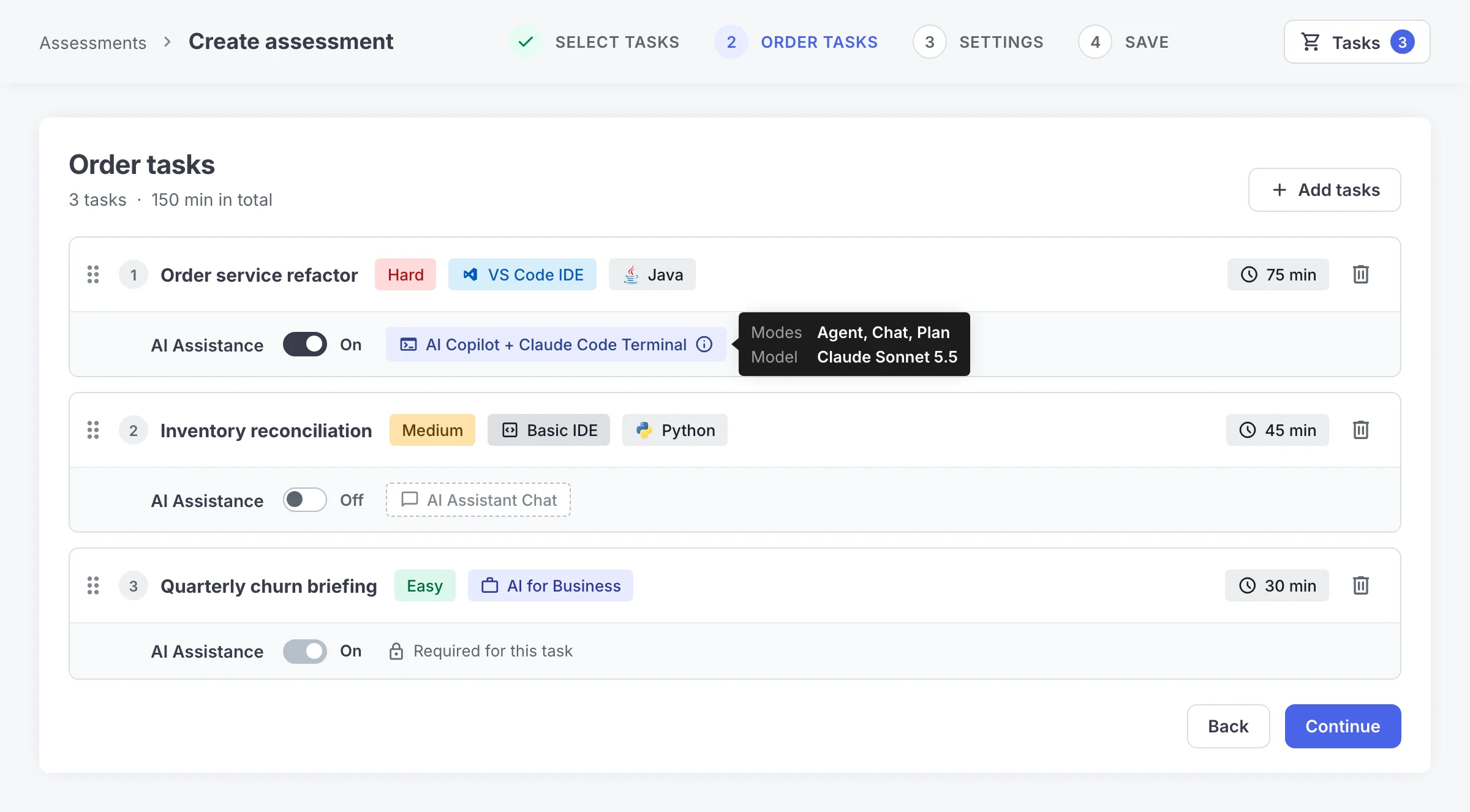
AI Assistance now switches on or off for each task in Screen and Skills Intelligence. One assessment can ask a candidate to build a feature with Claude Code, then fix a bug without AI.
In Interview, interviewers can now write AI Instructions that the AI Copilot and Claude Code follow, and candidates do not see them. Ask the agent to slip in a bug or a poor coding practice, and you see in real time whether the candidate reviews the code or copy-pastes it. Every prompt, command and code change is saved to the report, for each task where AI is on.
Anthropic released Claude Sonnet 5.5 on September 28 and OpenAI released GPT-6.1 Sol on September 29. We had both live in Codility on October 2. Claude Sonnet 5.5 is now in Claude Code, the AI Copilot and the AI Assistant chat. GPT-6.1 Sol is in the AI Copilot in Interview, and the AI Copilot also adds GPT-6 Luna.
Read why detecting AI use is the wrong hiring question.
Also new in September
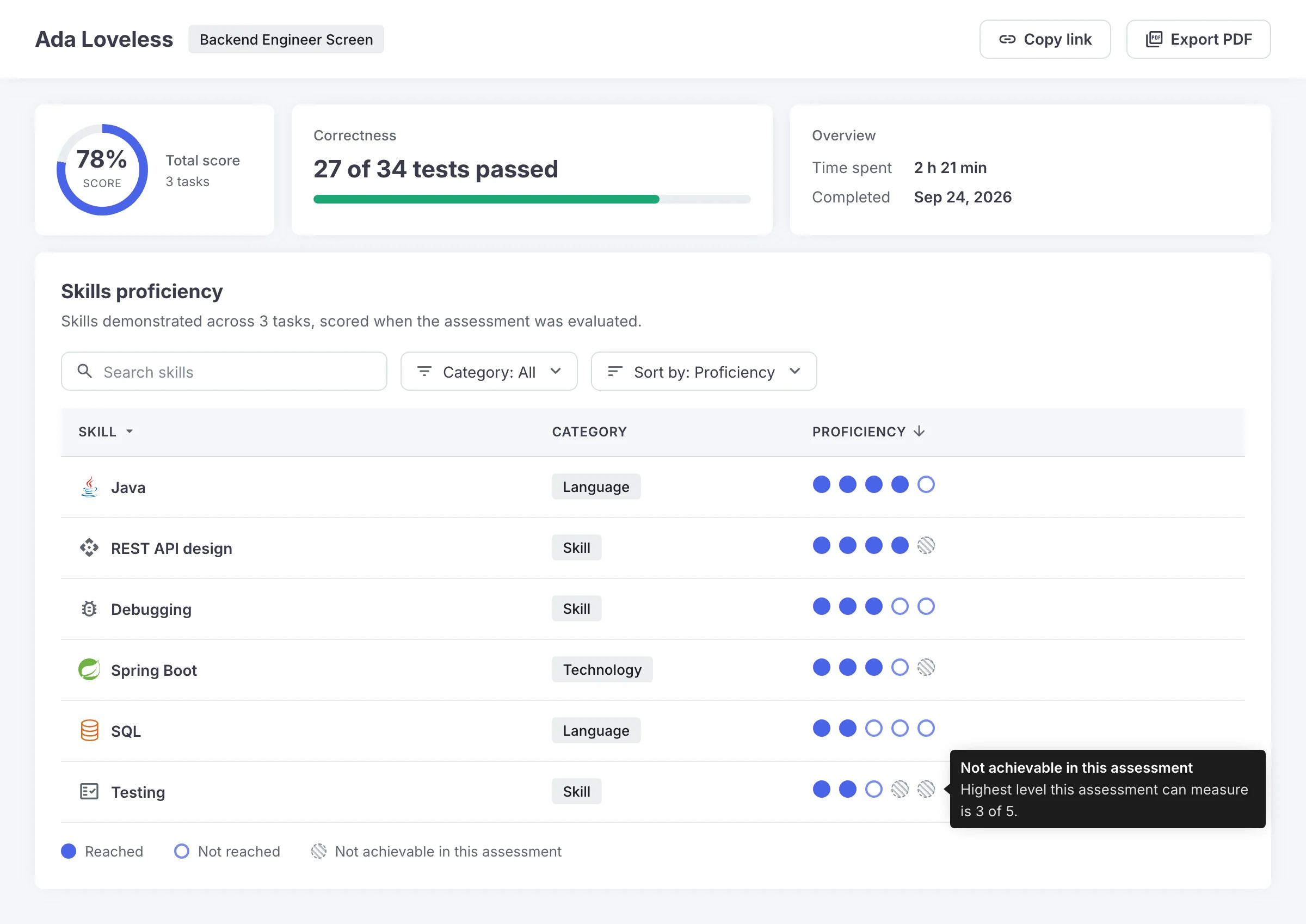
Skill levels in every report. Screen and Interview reports now show each skill a candidate demonstrated, with its proficiency level out of 5, next to the highest level the assessment could measure.
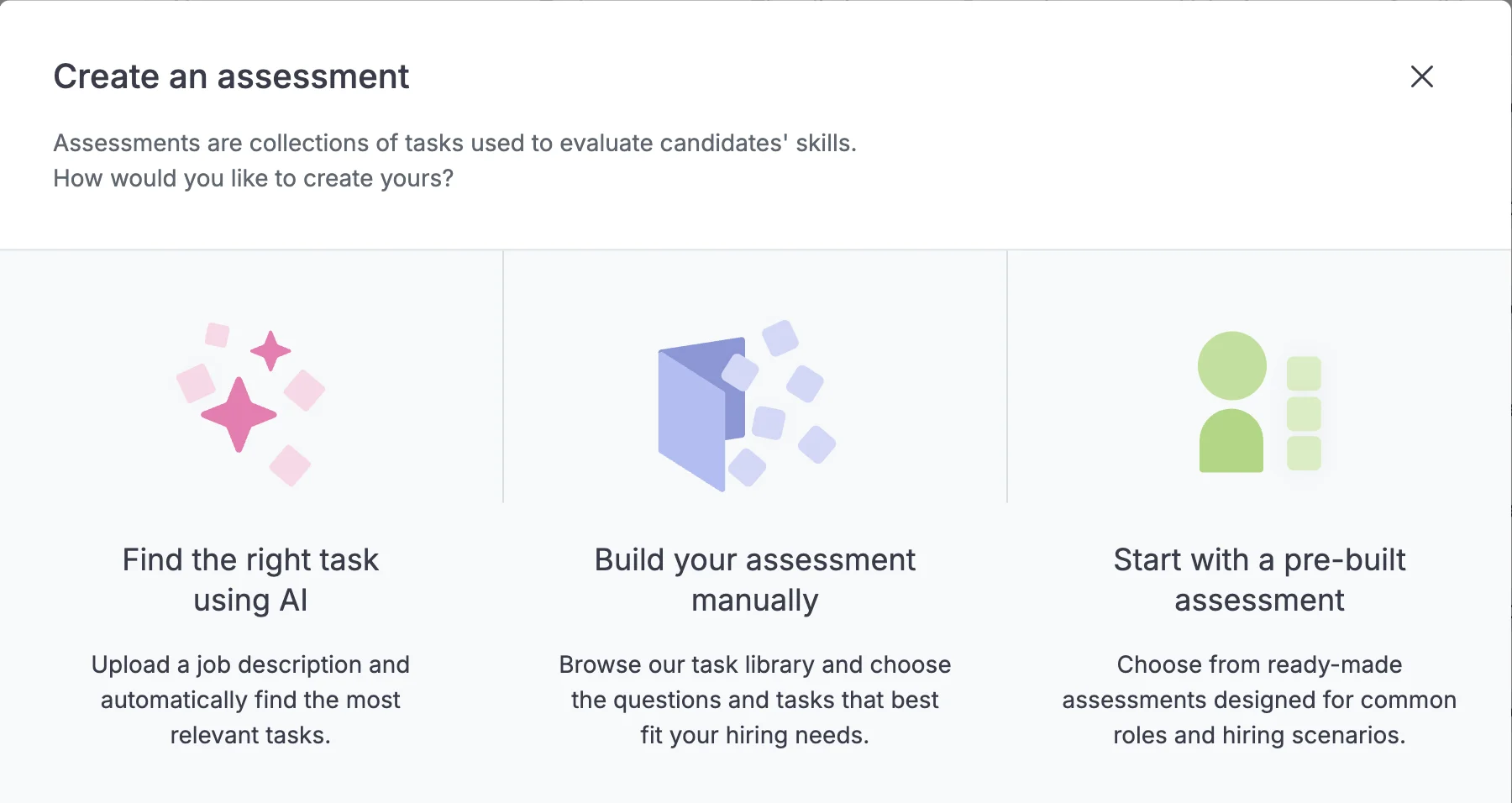
Tasks from a job description. One of the most requested features is now the first option when creating an assessment: Find the right task using AI recommends tasks from a job description.
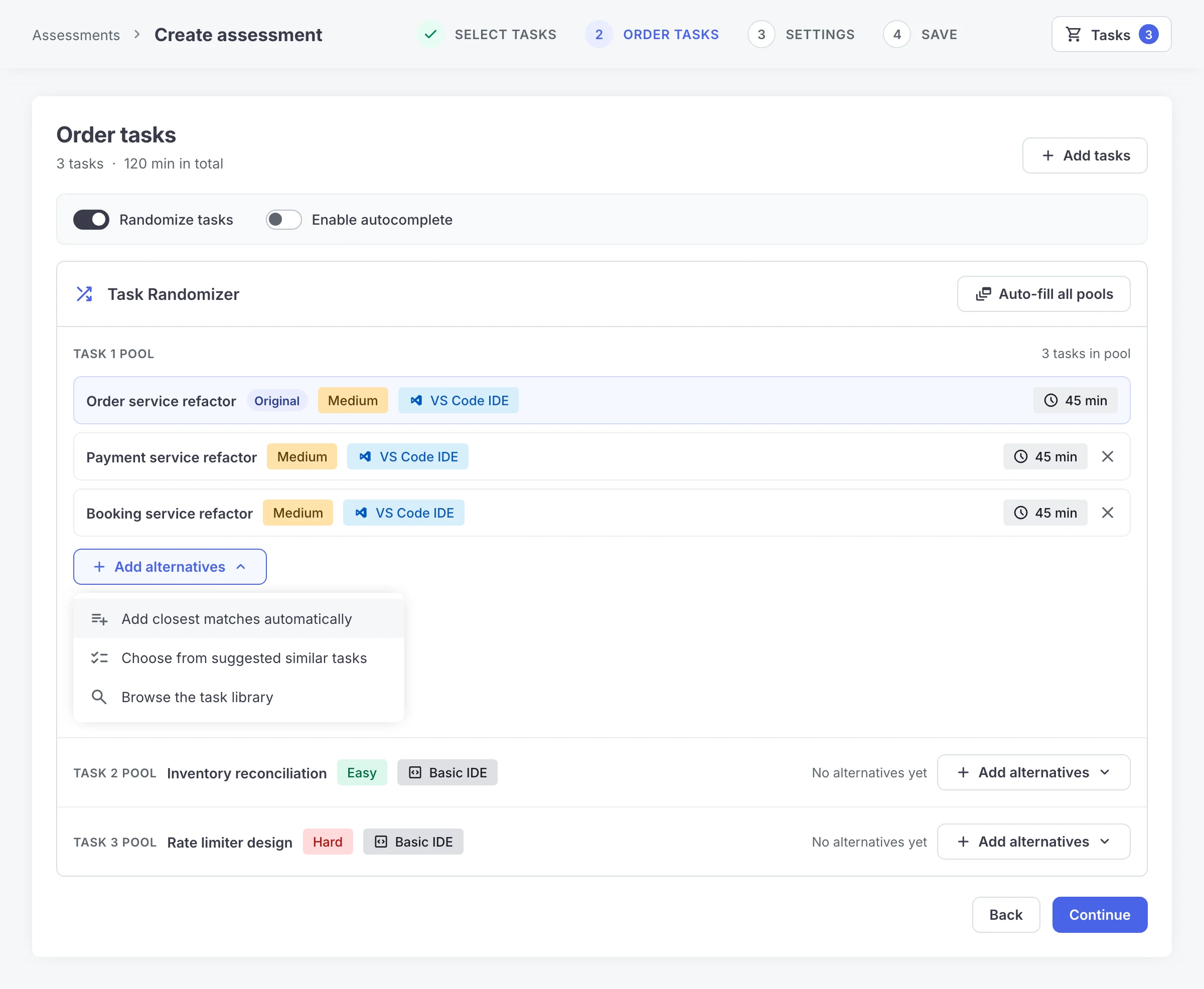
Random task sets in seconds. The Task Randomizer now suggests tasks for each pool, fills every pool in one click and sits inside assessment creation. It is in Closed preview.
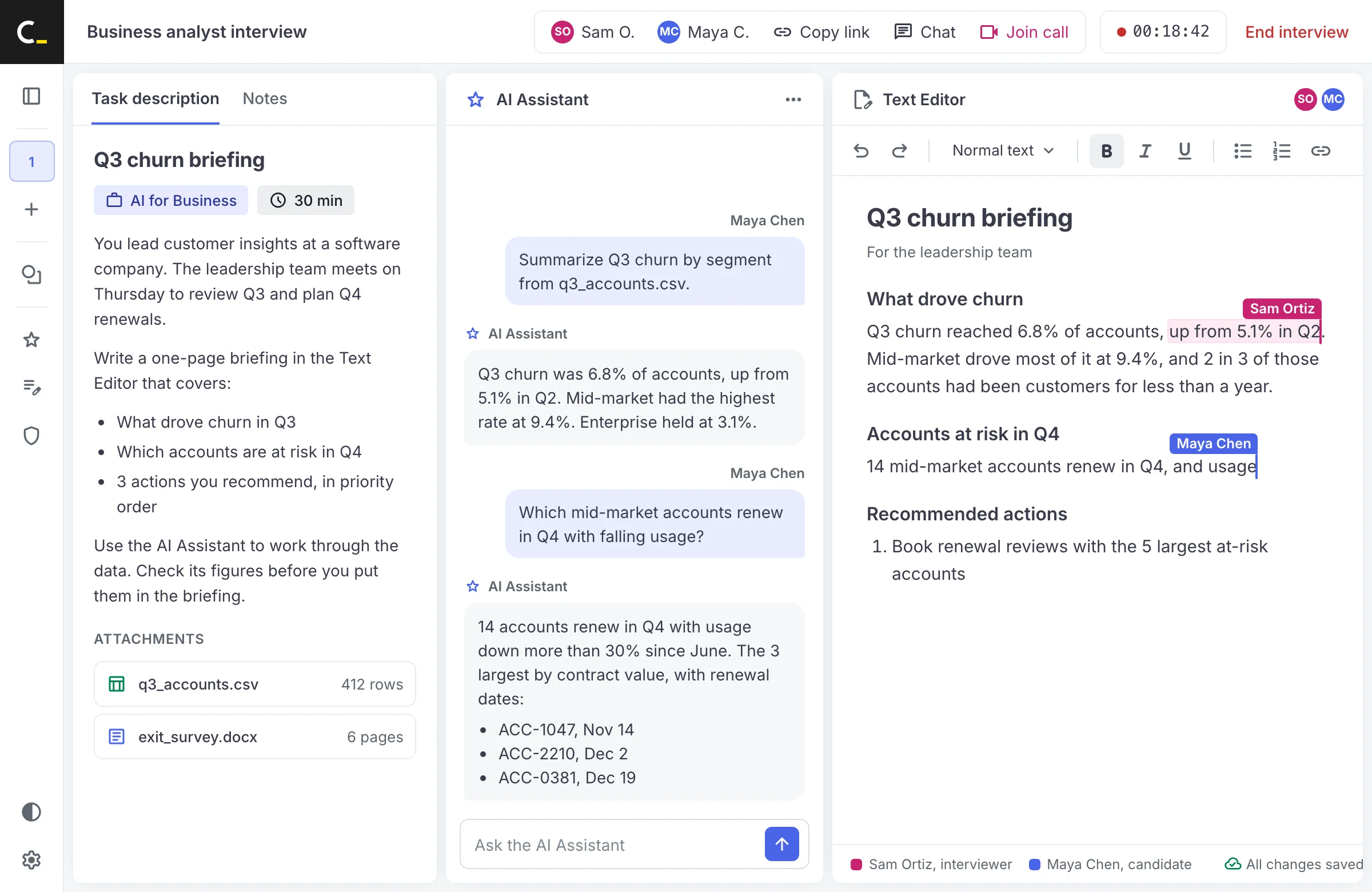
AI for Business in live interviews. AI for Business, Codility’s assessment for roles beyond engineering, now runs in Interview, in a text editor candidate and interviewer share in real time.
Remote access detection. Codility Desktop flags an active remote access session in the report, for sessions with Device Integrity on.
Everything that shipped in September
Every release from September 2026, whether or not it appears above. 20 entries.
AI Assistance switches on or off for each task
LiveOne assessment can now test how a candidate works with a coding agent and what they can do alone. AI Assistance has its own switch on every task in Screen and Skills Intelligence, and each task card shows exactly what the candidate gets. Every interaction stays in the Candidate Report for each task where AI is on.
What’s New
- An AI Assistance switch on every task card in Screen and Skills Intelligence
- A tag on each card showing what the candidate gets: AI Copilot and Claude Code Terminal for VS Code tasks, AI Assistant Chat for Basic IDE tasks
- Hover the AI Copilot tag to see the available modes and models
- Tasks that require AI, such as AI for Business tasks, stay on and are marked as such
- Settings follow your Screen defaults, including locks set for the account
- Settings can be adjusted until the first candidate is invited
Availability
Live for all accounts, in Screen and Skills Intelligence. In Interview, AI is set for each interview.
Claude Sonnet 5.5 and GPT-6.1 Sol, within 4 days of launch
LiveCandidates work with AI tools closer to the ones they would use at work. Anthropic released Claude Sonnet 5.5 on September 28 and OpenAI released GPT-6.1 Sol on September 29, and both were live in Codility on October 2. Claude Code, the AI Copilot and the AI Assistant chat now use Claude Sonnet 5.5, the AI Copilot adds 2 GPT models, and Claude Code itself has been updated. The AI Assistant chat now uses the same model in every region.
What’s New
- Claude Sonnet 5.5 replaces Claude Sonnet 4.5 in Claude Code and the AI Copilot
- In the AI Copilot, GPT-6 Luna replaces GPT-4o mini, and GPT-6.1 Sol replaces GPT-5 mini, in Interview only
- Claude Code in the VS Code terminal has been updated
- The AI Assistant chat uses Claude Sonnet 5.5 in both the EU and the US
- AI usage reports recognize the new models, so token and interaction counts stay complete
Availability
Live wherever AI Assistance is on. Existing settings and premium model access are unchanged.
Steer the coding agent during a live interview
LiveInterviewers can now steer the coding agent during a live interview. Tell the AI Copilot or Claude Code to slip in a bug or a poor coding practice, then see whether the candidate reviews the code or copy-pastes it. Or match the agent to how your own team works with AI. A new AI Instructions tab, visible only to interviewers, sets instructions both agents follow. Autocomplete usage is now also part of AI Usage Insights for every customer.
What’s New
- An AI Instructions tab next to the task description, visible only to interviewers
- Click Apply to use the instructions with both the AI Copilot and Claude Code
- The AI Copilot picks up changes immediately, and Claude Code uses them from its next new conversation
- Instructions are shared across interviewers and saved within the session
- Autocomplete usage now included in AI Usage Insights
Availability
Live for all customers, in Interview. Instructions are not yet saved with custom tasks.
Skills proficiency in Screen and Interview reports
Open previewHiring managers get a skill-level signal they can act on. Screen and Interview reports now show which skills a candidate demonstrated and the level reached in each, on the same award-winning proficiency scale as Skills Intelligence. The highest level the assessment could measure sits beside each skill, which is designed to keep the read fair.
What’s New
- A Skills proficiency section on Screen and Interview reports, with search, filters and sorting
- Each skill on a five-level proficiency scale, viewable for the whole assessment and per task
- The highest level each assessment could measure, shown for every skill
- Scored automatically once an assessment is evaluated or an interview closes, for Basic IDE and VS Code tasks
- Included in shared links, the PDF report and reports attached to applicant tracking systems
- When nothing can be scored, the report explains why
Availability
In Open preview, so it is on for every account. Only library tasks with skill tags are scored. Whiteboard, Miro, text and free-coding environments in Interview are not.
The Task Randomizer suggests alternatives, inside assessment creation
Closed previewBuilding a balanced random assessment no longer takes deep knowledge of the library. The Task Randomizer now suggests similar tasks, fills every pool in one action and opens right inside assessment creation, through a Randomize tasks toggle, for new and existing assessments.
What’s New
- An Add alternatives menu: closest matches automatically, a list of suggested similar tasks, or the task library with the original task’s difficulty and time limit applied
- Auto-fill all pools populates every pool in one action
- A Randomize tasks toggle in the Order Tasks step, when creating or editing an assessment
- Pool selections save automatically on the next step, with a warning before going back
- A redesigned interface matching the Task Library’s search
- The existing Randomize tasks option in assessment settings stays available
Availability
In Closed preview, for accounts with the Task Randomizer switched on. To have it switched on, contact [email protected] or your account manager.
Find the right tasks from a job description
LivePicking tasks for a new role no longer depends on knowing the task library. One of the most requested features, it is now the first option when creating an assessment: Find the right task using AI takes the job description, shows the technologies and skills it found, and recommends tasks from the Codility library and your own.
What’s New
- Find the right task using AI, the first option in the Create an assessment dialog
- Add a job description and get recommended tasks
- Review and edit the technologies and skills it identified before getting recommendations
- Recommendations include tasks your own team created
- If a description is too thin, it says what is missing
Availability
Live wherever AI features are on for the account. Start a new assessment to try it.
AI for Business tasks run in live interviews
Open previewAI for Business brings Codility to every role beyond engineering, with real work done alongside an AI assistant and scored by fixed rules. It runs inside the same Screen, Interview and Skills Intelligence, for hiring into business roles and for assessing current business teams. Its tasks now run in live interviews, in a text editor that candidate and interviewer share in real time.
What’s New
- AI for Business tasks available in Interview
- Real-time typing on both sides, with no blinking or jumping
- A colored cursor with each person’s name
- Undo reverses only your own changes
- Text is kept if the connection drops and returns
- Reports look the same as before
Availability
AI for Business is in Open preview, so it is on for every account. The shared text editor is live in Interview.
A clearer AI Copilot view for interviewers
LiveInterviewers can follow the candidate’s work with the AI Copilot and keep their attention on the interview. The chat now shows when the candidate is typing a prompt, and the settings an interviewer does not need are less prominent.
What’s New
- An indicator at the top of the chat when the candidate is typing a prompt
- Disabled fields with tooltips, so it is clear which areas are not interactive
- Agent and model selection redesigned so the settings that matter to the interviewer stand out
Availability
Live, in Interview.
The Screen report inside a live interview
LiveThe interview starts from the code the candidate actually wrote. Any interviewer can now bring a candidate’s Screen report into the interview room, with nobody setting it up in advance, and each task opens in the language the candidate used.
What’s New
- A Screening report tile next to Templates in an empty interview room, with a searchable list of finished Screen reports
- A Suggested for this interview card with this candidate’s report, attached in one click
- Every task arrives with the candidate’s solution, even after the candidate has joined
- Each task opens in the candidate’s language with their code in the editor, including interviews created from a Screen report
Availability
Live for all customers in Interview. Anyone who can already see Screen reports in their account can use it.
Several technology-agnostic tasks in one interview
LiveInterviews can be structured the way a team wants to run them. A technology-agnostic task can now fill every task slot of an interview, for open-ended conversations, system design or any exercise not tied to a language.
What’s New
- A technology-agnostic task available in every task slot
- Every technology-agnostic task used appears in the report
Availability
Live for all accounts in Interview, in the Basic IDE technology-agnostic environment.
Remote access detection in Codility Desktop
Open previewRemote control of a candidate’s machine is a common route to outside help during an assessment. Codility Desktop now detects an active remote access session and flags it in the session report, designed to give reviewers clear visibility of that kind of attempt.
What’s New
- Codility Desktop detects active remote access sessions
- A new Remote access signal in the session report
- Pattern Detection now flags retyping from another screen or device at a lower threshold
Availability
For all customers using Device Integrity in their sessions. Device Integrity is in Open preview.
A more accurate suspiciously short time signal
LiveFlags on the Integrity Risk report are more accurate, especially on VS Code, AI for Business and customer-authored tasks. The short-time threshold now comes from real solve times for each task, where it had fallen back to a flat 2 minutes for most tasks.
What’s New
- Thresholds derived from real solve-time data per task
- Tasks without enough history use 10% of their recommended time
- Multiple-choice questions are no longer flagged
- Assessments scored zero no longer pull a task’s average down
- The statistics behind the signal now cover far more of the library
Availability
Live. The signal points a reviewer at a session and decides nothing on its own.
The Codility MCP server for your own AI assistant
Closed previewAsk the AI assistant you already use about your assessment data. The Codility MCP server connects Claude, ChatGPT or another assistant to your account through MCP, the standard way AI assistants link to other software, so you can ask for sessions, candidate histories and test results, or an export, and repeat a report on a schedule.
What’s New
- Find sessions by date and status, and list candidates with test, score and report link
- Open one candidate’s profile with every session they sat
- Search assessments and list a folder of assessments
- Download a session report as a CSV or Excel file, with the per-task breakdown
- Browser sign-in, with no API keys to manage, and separate US and EU connections
- Read-only, using the signed-in person’s own permissions
Availability
In Closed preview. To ask about access, contact [email protected] or your account manager.
SystemVerilog and a Hardware Engineer role
LiveCodility can now assess engineers who design chips, for semiconductors, telecom and networking equipment, aerospace and defense, automotive electronics and AI accelerators. 15 SystemVerilog tasks arrived with a Hardware Engineer role in the task library, and teams can build their own SystemVerilog tasks.
What’s New
- 3 Starter Library tasks: a priority encoder, an ALU with signed and unsigned flags, and a pipelined multiply-accumulate
- 12 Core Library tasks, from counters and state machines to a UART transmitter, an AXI4-Lite subordinate and a small multicycle CPU
- A Hardware Engineer role in the task library
- SystemVerilog in the self-serve content editor and the task creation MCP server
Availability
Live, available according to your packages.
20 short AI for Business tasks
LiveEveryday work with an AI assistant can now be screened in minutes, for business hiring in any role. 20 new tasks take about 5 to 15 minutes each, at elementary to easy difficulty and suited to any role, for assessments where 30 or more minutes of task time was the blocker.
What’s New
- 10 everyday prompting tasks, such as drafting an agenda, warming up a blunt email or summarizing for an executive
- 10 inbox scenarios, each a messy moment that needs one written message, such as a double booking or a deadline pulled forward
Availability
Live for all customers. Included in your plan.
Modern Java, a paired build and new VS Code tasks
LiveNew tasks show whether an engineer can bring old code up to date, and add performance tasks that measure more than speed. More than 40 new tasks shipped across September, counting SystemVerilog and the short AI for Business tasks.
What’s New
- Java 8 to Java 21 modernization tasks on sealed interfaces, records, pattern matching and the SequencedMap API, each for both editors
- A VS Code task that turns a single-player inventory grid into a co-op one over WebSocket
- A frontend and backend task pair on one shared design, both technology-agnostic
- 2 library favorites moved to VS Code, and 2 performance tasks that count function calls in 9 languages
Availability
Live, available according to your packages.
Real-life C# tasks run on .NET 10
LiveCandidates write against current C# and .NET 10 APIs, on runtimes that are supported. Every real-life C# task moved to .NET 10, with MySQL and PowerShell updated to long-term support releases. The team checked every changed task against its recorded results, solution by solution and test by test.
What’s New
- 56 C# tasks on .NET 10, supported until November 2028
- MySQL 8.4 and PowerShell 7.6, both long-term support releases
- Task descriptions list the library versions the tasks run on
- The old versions are replaced
Availability
Live for all real-life C# tasks, except 4 calculator sample tasks that keep their versions and 8 Interview and technology-agnostic tasks that stay on .NET 9 for now.
Submitted tasks close, and coding environments are freed up sooner
LiveCandidates get one clear flow in both editors, and coding environments are freed up sooner during large hiring rounds. A submitted task is now marked complete and closed in Basic IDE and VS Code alike, which releases its environment straight after scoring.
What’s New
- A completed badge on submitted tasks, which can no longer be opened
- A submit dialog that states the solution cannot be viewed or edited afterwards
- A submitted VS Code task releases its environment after scoring
- Assessments with several VS Code tasks start each one by hand
- When demand peaks, candidates wait to start until an environment is free
Availability
Live for all accounts.
A collapsible solution panel in every product
LiveCandidates and interviewers get more room for the part of the session they are working in. The code editor now folds away the same way the task description does, in every product, on both VS Code and the Basic IDE.
What’s New
- A collapsible solution panel in every session where it appears
- Headers, arrows and spacing aligned whichever panels are collapsed
Availability
Live for all accounts.
What’s New in the app sidebar
LiveWhat changed in Codility is now one click away from the product. The app sidebar carries a What’s New link that opens these product updates.
What’s New
- A What’s New item at the bottom of the app sidebar
Availability
Live for all accounts.
Frequently asked questions
Can I turn AI on for some tasks and off for others in one Codility assessment?
Yes. In Screen and Skills Intelligence, AI Assistance has its own switch on every task. Tasks that require AI, such as AI for Business tasks, stay on. In Interview, AI is set for each interview.