

June’s headline release: the Excalidraw whiteboard comes to Interview. Plus a G2 milestone for Skills Intelligence and more releases across Screen, Interview, and the API.
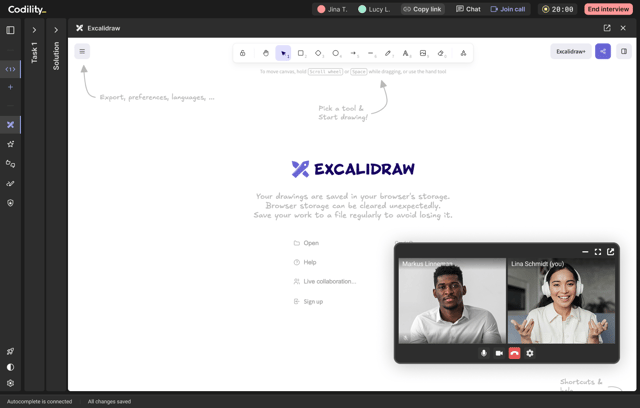
The Excalidraw whiteboard comes to Interview. System design interviews need a real drawing surface, and switching out to a separate tool broke the flow. Interviewers can now open an Excalidraw whiteboard alongside any interview environment, sketch architecture in real time with the candidate, and keep every board attached to the report for later review. It runs on Codility’s own domain, so there is no third-party domain to whitelist. Preview in Interview.
Save an interview environment as a library task. Setting up a VS Code interview environment takes effort, and until now you spent it again every session. You can now save a configured environment as a reusable task and pull it into future interviews from your library, one of the most requested additions to Interview. Preview.
Cheating apps detection reaches Preview. AI helper tools that hide from screen sharing can make a session look clean. The new Codility Desktop App is designed to surface them, with the evidence handed to a human reviewer. Preview in Screen and Interview.
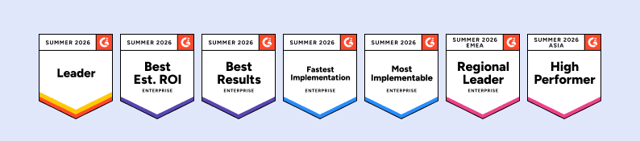
Codility Skills Intelligence earns G2 recognition in the Skills Management category. In its first season in G2’s Skills Management category, Skills Intelligence was named a Leader and a High Performer, with category wins for results, return on investment, and implementation among enterprise teams. The recognition is built on verified customer reviews.
Screen work carries into the follow-up interview. When you create an Interview from a Screen report that included a VS Code task, the candidate’s solution now loads automatically, so the conversation picks up where the screen left off. The shared candidate report also gained per-file copy and full-solution download. Live for all.
Flexible Assessment Programs are now generally available. Programs are fully GA for every Skills Intelligence account, with per-assessment team selection so one Program can run different assessments for different teams. Live for all Skills Intelligence customers.
Excalidraw Whiteboard
Open previewSystem design and architecture discussions are core to technical interviews, and the previous whiteboarding path added friction. The general-purpose tool felt awkward for engineering diagrams, gave one global board per interview, and often needed a security review before a team could use it. The Excalidraw whiteboard is built into the interview surface instead.
Why It Matters
- Purpose-built for engineers: Excalidraw is lightweight and familiar, well suited to architecture diagrams rather than general-purpose drawing.
- Scoped to the task, captured in the report: open a board in one click from inside the task, and it is saved against that task so reviewers can see exactly what was drawn.
- No IT whitelisting: the whiteboard runs on Codility’s own domain, so there is no third-party domain for procurement or security to approve.
What’s New
- Open an Excalidraw whiteboard alongside any interview environment for real-time collaboration
- Boards persist with the interview and appear next to the tasks in the report
- Enable or disable the whiteboard per account in account settings, on by default
Preview in Interview. Enabled by default, and can be turned off in account settings.
Save Interview Environment as a Library Task · Preview
Closed previewSetting up a VS Code interview environment the right way takes effort, and until now that effort was spent again every session. This release lets interviewers save a configured environment as a reusable task in the task library.
Why It Matters
- Reuse instead of rebuild: once an environment is set up the way you want, save it as a task and pull it into future interviews from the library.
- Less repetitive work: stop recreating the same setup from scratch each session.
- Proven environments, reused: run interviews from the same setups your team already trusts.
What’s New
- Save a configured VS Code interview environment as a task in your account’s task library, with a name
- Stored with the task: name, synopsis, task description, and workspace
- Saving again from the same environment creates a new task each time
Preview. If interested, please contact your CSM to learn more.
Screen Work Carries Into the Interview
LiveYou could already create an Interview from a Screen report. Now, when that report included a VS Code task, the candidate’s solution carries over too, so the follow-up starts from their actual work instead of a blank environment.
Why It Matters
- Continuity from screen to interview: when you create an Interview from a Screen report that included a VS Code task, the candidate’s solution loads automatically.
- Less setup, more conversation: interviewers pick up exactly where the candidate left off, rather than rebuilding context at the start of the session.
What’s New
- Candidate solutions from a Screen VS Code task pre-load into the follow-up Interview
Live now in Interview for all customers. The VS Code experience in Screen remains in Preview.
G2 Skills Management Recognition
LiveBuyers increasingly check verified peer reviews before they shortlist a vendor. G2 added a Skills Management category, and Skills Intelligence entered it for the first time this season.
Why It Matters
- Verified by customers: G2 badges are earned from verified user reviews, not vendor claims.
- Strong first season: named a Leader and a High Performer, with category wins for results, return on investment, and implementation among enterprise teams.
- The same methodology, recognized for workforce skills: one assessment science runs across hiring and the engineers you already have, and the Skills Management recognition reflects how that holds up internally.
What’s New
- Leader and High Performer recognition in G2’s Skills Management category
- Enterprise category wins for best results, best estimated return on investment, fastest implementation, and most implementable
- Regional recognition across Asia and Asia Pacific
Ask your account manager or CSM to learn more about Codility Skills Intelligence, they’ll be happy to work with you to understand if it’s the right fit for your organization.
Flexible Assessment Programs Are Now Generally Available
LiveFlexible Assessment Programs are now generally available to every Skills Intelligence account. Programs replace rigid, invite-heavy assessment rounds with a flexible structure built for enterprise-wide rollouts.
Why It Matters
- Built for scale: Programs are designed for enterprise-wide rollouts rather than one round at a time.
- One Program, many teams: per-assessment team selection lets you narrow a single assessment’s audience to a subset of the Program’s teams, so a Java assessment can run for the backend team and a Python assessment for the data team inside one Program.
What’s New
- Flexible Assessment Programs reach general availability for all Skills Intelligence accounts
- Per-assessment team selection within a single Program
Live now for all Skills Intelligence customers.
Shared Candidate Report: Copy and Download
LiveThe new shared candidate report was missing a step that the legacy report had, which kept some teams from fully moving over. May closed that gap.
Why It Matters
- Reviewers keep their workflow: copy an individual file or download the full solution directly from the shared report.
- Fewer reasons to stay on the legacy report: the capability that blocked some migrations is now in place.
What’s New
- Copy individual files from the shared candidate report
- Download the full solution for basic IDE and multi-file tasks
Live now for all customers.
Cheating Apps Detection
Closed previewA category of AI helper tools, such as InterviewCoder, Cluely, and similar applications, sits in an overlay window that is deliberately hidden from screen sharing. Standard proctoring captures what it can see, so a session that uses one of these tools can look clean. Cheating apps detection is Codility’s purpose-built response.
Why It Matters
- Surfaces hidden helpers: candidates take the assessment inside the new Codility Desktop App, which is designed to surface invisible AI helper tools that screen sharing cannot.
- Built for an evolving category: the method targets the category of invisible AI helpers, so newly released tools of the same kind can be picked up as they emerge.
- Evidence for a human decision: when a tool is identified, the evidence is surfaced to the reviewer. Codility does not auto-fail the candidate, a human decides.
What’s New
- The Codility Desktop App for macOS and Windows, a mandatory gate when enabled
- Configurable per assessment and per interview, with an account-level default in Screen settings
- Works alongside browser and video proctoring, with results in the report integrity widget and live notifications for interviewers
Preview in Screen and Interview. Contact your CSM or support to learn more.
More Accurate Time on Task and Tighter Video Proctoring
LiveTwo refinements to the Screen experience. Effective time on task is now more accurate, and video proctoring is harder to work around.
Why It Matters
- Time that reflects real effort: effective time on task no longer counts time after a candidate force-quits without submitting, stops acting on a task for more than three minutes, or leaves the platform, which now pauses the timer.
- Reviewable evidence holds up: when a required input such as the camera is unavailable, or recording stops because of a connection issue, the task description and solution are hidden, so attempts are captured on the recorded session.
What’s New
- Refined effective-time calculation in the Screen report
- Task description and solution hidden when a mandatory input is unavailable or recording is interrupted
Live now for all customers.
Platform Improvements
LiveSmaller releases that reduce friction across the platform.
- AI Assistant moved to the right of the screen: the AI Assistant now sits on the right for both candidates and interviewers, in Screen and Interview, matching the placement people already know from AI Copilot and similar tools.
- Richer Public API Sessions list: GET /api/sessions/ now returns session summary data inline, including test name, team, score, passing score, correctness and performance percentages, time used, and reviews, so integrations and dashboards need fewer calls.