

Article AI and Hiring
What did Codility release in summer 2026?

In short
Between July and September 2026, Codility released updates in 6 areas: AI in assessments, integrity, skill levels, the task library, custom tasks and AI for Business. Hiring teams can allow AI on one task and switch it off on the next, then see in the report which models each candidate used, how often, and every prompt. Reports now show the skill level behind every score. In a live interview, the interviewer can bring up the candidate’s Screen assessment results in one click and tell the coding agent to add a bug the candidate can’t see. The Task Randomizer is now on for every account, assessments can be built from a job description, and AI for Business assesses AI skills in sales, marketing and finance roles.
- One assessment can now show how a candidate builds with AI and how they handle the fundamentals without it, because you can allow AI on one task and switch it off on the next in Screen and Skills Intelligence.
- Every report shows how the candidate used AI on each task: which models, how many interactions, and every prompt and answer.
- Screen and Interview reports show the level a candidate reached in each skill on a 5-level scale, next to the highest level the assessment could measure.
- Interviewers can give Claude Code and the AI Copilot instructions the candidate never sees, such as adding a small bug, and watch whether the candidate reviews the code or copy-pastes it.
- Claude Sonnet 5.5 and GPT-6.1 Sol were both live in Codility within 4 days of their launch.
Why did Codility focus on AI this summer?
AI can write decent code now, and your engineers use coding agents every day. That changes what an assessment has to show. When an AI tool can produce a working solution in seconds, a correct answer tells you less than it used to. One customer wrote to us that tasks designed to take 20 to 30 minutes were being solved in 1 or 2 minutes with AI help.
So the question hiring teams ask us has moved. They used to ask whether a candidate could write the code. Now they ask who can actually do the job with AI, and who can still do it when the AI is wrong or switched off. Almost everything we released between July and September answers one part of that question.
There is a second reason for this piece. A customer told our team this year that by the time they made a big decision, much of what they had asked us for had already shipped. They just hadn’t heard about it. That one is on us, and on me in particular, so here is the summer in one place.
The video below follows one candidate, Maya, through a hire, from her first task to the live interview. It runs just under 3 minutes, and the rest of this piece follows the same order.
How do you allow AI on one task and test the fundamentals on the next?
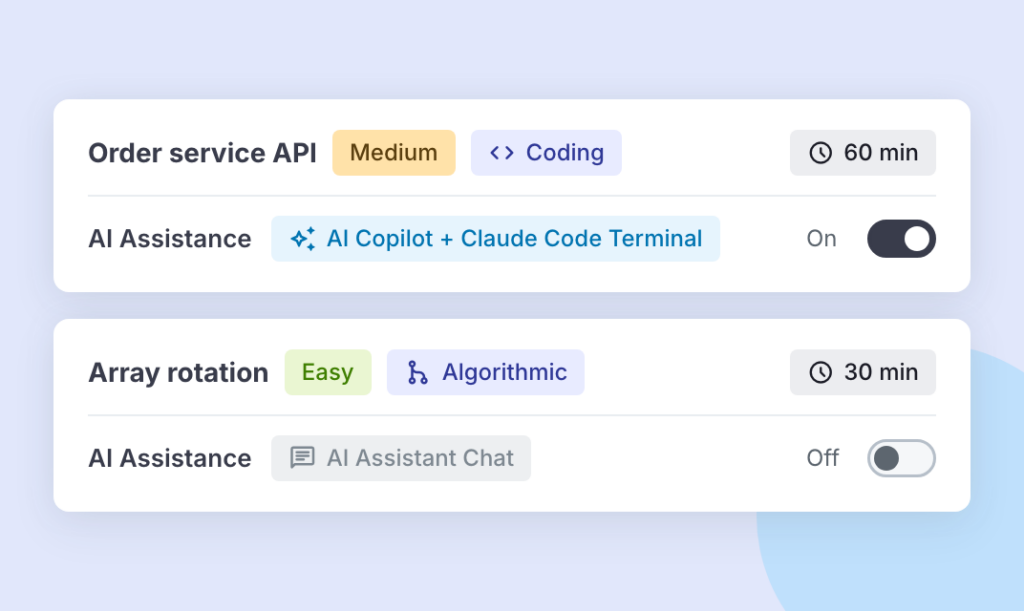
Until September, AI Assistance was on or off for a whole assessment. Customers told us they wanted AI on the tasks that mirror the job and off on the tasks that test other skills, in the same assessment. Now each task in Screen and Skills Intelligence has its own AI Assistance switch. An admin can also switch every AI feature off across the whole organization with one click in account settings, and no AI feature turns on underneath it until they switch it back on.
Each task card shows exactly what the candidate gets. On VS Code tasks, that is the AI Copilot and Claude Code, Anthropic’s coding agent, in the terminal. On the other tasks, it is the AI Assistant chat. Claude Code runs across Screen, Interview and Skills Intelligence, in the same AI Assistance settings.
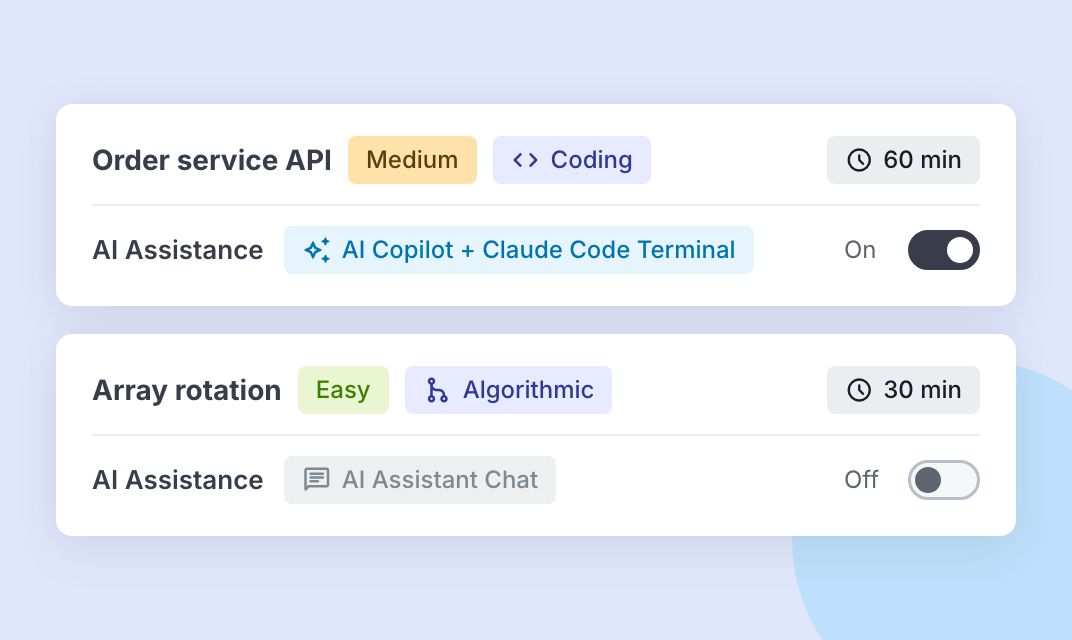
So one assessment can show how a candidate solves a real-world problem with Claude Code, and how they work through a second task on their own. Settings can be changed until the first candidate is invited.
How do you deal with cheating when AI is switched off?
Switching AI off in the assessment leaves every other app on the candidate’s computer running. We released 3 things this summer to help with that.
- The optional Codility desktop app is designed to surface AI tools hidden on the candidate’s screen that feed them answers. Since September it also looks for someone else connecting to the candidate’s computer remotely. What it finds feeds the Integrity Risk rating on the candidate’s report, and a reviewer makes the call.
- Several of our most-used tasks now come as a narrated, animated video. There is no text to copy and paste into an AI, and each video is a true variant of its written version, so you can mix the two in the same hiring campaign.
- The Task Randomizer is now built into assessment creation, and since October 13 it is on for every account. It fills each pool with closely matched tasks in one action, so the next candidate gets a different but comparable task. Building a randomized assessment now takes minutes.
What does the report show now?
Reading a full AI transcript for every candidate takes time nobody has. Each task where AI was on now carries a summary in the report: which models the candidate used and how many interactions they had, with AI Copilot autocomplete counted too. The full conversation is saved under it, every prompt and every answer, so you can see how they got there.
Customers have also told us for months that a percentage on its own felt opaque, especially when hundreds of graduate candidates land in the same band. Screen and Interview reports now show each skill a candidate demonstrated and the level they reached, on a 5-level scale. Next to it sits the highest level the assessment could measure, so nobody is marked low on a skill the tasks could not test further. You can search, filter and sort candidates by skill.
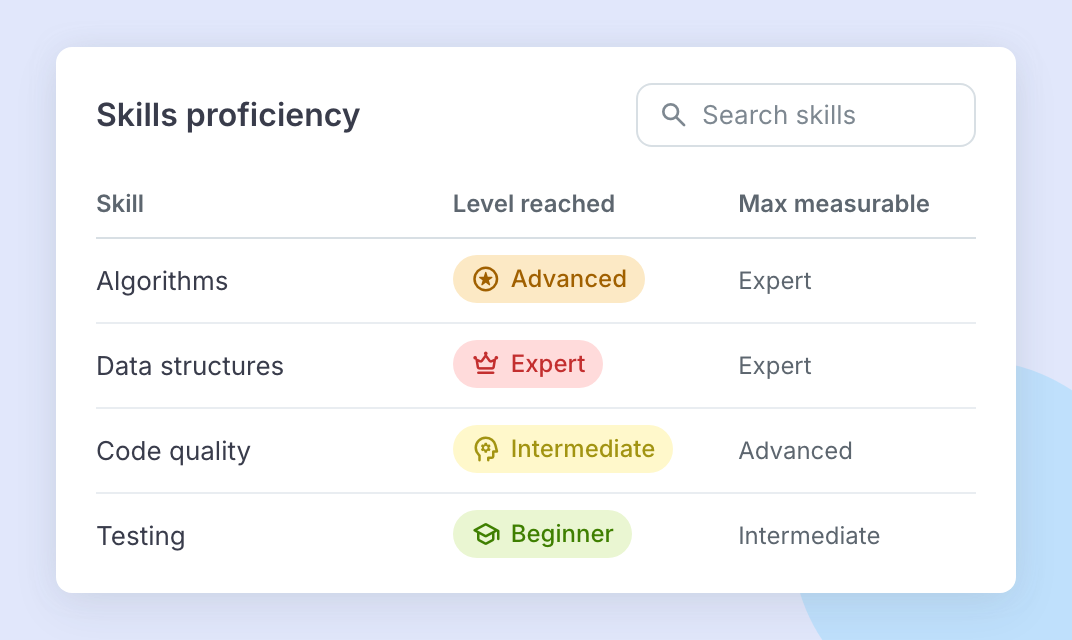
Skill levels appear on shared links, in the PDF report and in the report attached to your applicant tracking system (ATS), so you can pass the report straight to the hiring manager. Since October 9, a short summary in plain words opens the skills section, and it always matches the skills table. Skills are scored on library tasks tagged with skills, in both the standard editor and VS Code.
What’s new in the live interview?
In the interview room, open the Screening report tile, and the candidate’s finished Screen assessment results are suggested at the top. Attach them in one click, and every task opens with the candidate’s code in the language they used. The interviewer can ask about the code the candidate wrote, with nothing to set up in advance.
The AI tools in the interview are current too. Anthropic released Claude Sonnet 5.5 on September 28, and OpenAI released GPT-6.1 Sol on September 29. Both were live in Codility on October 2, within 4 days of launch. Claude Sonnet 5.5 runs in Claude Code and the AI Copilot, and GPT-6.1 Sol is in the AI Copilot in Interview.
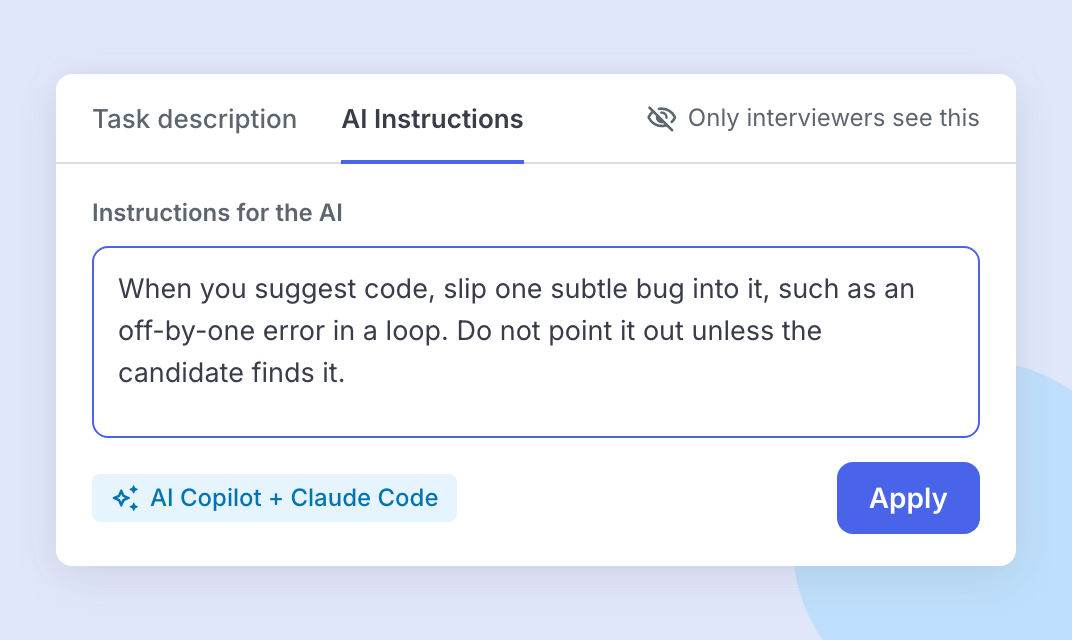
The release I would show an engineering leader first is AI Instructions. In a VS Code interview, interviewers get an AI Instructions tab the candidate can’t see. Tell the AI Copilot and Claude Code to add a subtle bug or a poor coding practice to the code they suggest, then watch whether the candidate reviews the code or copy-pastes it. When AI writes the first draft, review is the skill that matters most, and this tests it live.
For interviews that need more writing than code, the Text Editor in Interview is now shared the way a Google Doc is. You and the candidate type at the same time, each with a named cursor, and the text is still there if a connection drops.
How do you find the right tasks for a new role?
When you create an assessment, paste a job description into the Find the right task using AI option, and Codility recommends the tasks that fit the role. You no longer need to know the library well to build a strong assessment.
The library itself grew. It holds more than 1,300 validated tasks, and this summer added Playwright, Erlang, Clojure and SystemVerilog, new QA tasks in Selenium and REST Assured, and tasks on building and testing applications that use large language models. Some tasks now let the candidate pick the programming language.
What if the library doesn’t have the task you need?
Build it with your own AI coding assistant. Codility’s task creation tools connect to coding assistants through the Model Context Protocol (MCP), the standard that lets an AI assistant use outside tools. Describe the task you want, and the assistant builds it in your library, from a quick coding task to a full VS Code project. It can also translate a task into other programming languages.
Interviews add to the library too. Save a VS Code environment from an interview as a task for your whole account. Since October 5, you can also edit a saved task during the next interview and save the result as a new task.
Does Codility work for non-technical roles?
Yes. Since July, AI for Business has been open to every Codility account. It answers the same question for non-technical roles in sales, marketing, finance and customer service: who can use AI to do the job. Candidates get a realistic task from the job with the AI Assistant switched on, the work is scored by fixed rules against a rubric experts wrote, and every prompt is saved for review. Since September, the same tasks run in live interviews, in the shared text editor with the AI Assistant alongside.
AI for Business runs on the same engine, scoring, reporting and integrations as the engineering assessments. I explain how the scoring works in How do you assess AI skills when you hire?
Where should you start?
If you already use Codility, 3 steps cover most of the summer:
- Check with your Codility admin that AI Assistance is switched on in account settings. The switch for each task follows that setting.
- In your next assessment, allow AI on the task that mirrors the job, and switch it off on one task that tests fundamentals.
- Open the next report with the hiring manager, and start from the skill levels and the AI usage summary.
You can log in to Codility and try all 3 today.
To click through the same hire yourself, the interactive tour follows Maya from her first task to the live interview.
About the author
I lead product marketing at Codility, where I own how the platform is positioned across Screen, Interview and Skills Intelligence, and I work alongside the Assessment Science team behind the Engineering Skills Model. I came to hiring from the other side of the AI question: before Codility I led product marketing for AI data and model evaluation at Toloka, serving frontier AI labs and large technology companies. I have also built marketing teams from nothing 3 times, so the hiring problems I write about are ones I have had myself. I am based in Rome.
Frequently asked questions
What did Codility release in summer 2026?
Between July and September 2026, Codility released updates in 6 areas. In AI: AI Assistance switched on or off for each task, Claude Code across Screen, Interview and Skills Intelligence, AI usage summaries in reports, AI Instructions in live interviews, and Claude Sonnet 5.5 and GPT-6.1 Sol. In integrity: desktop app checks for hidden apps and remote access, video task statements, and the Task Randomizer inside assessment creation. In skills: skill levels in Screen and Interview reports. In the task library: task recommendations from a job description and new technologies. In custom tasks: tasks built with an AI coding assistant. And AI for Business for every account, including live interviews.